Simulation Model
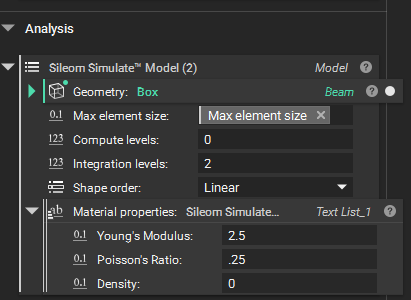
Before running our simulation we need to package all of our parameters into a Sileom Simulate Model block. Let’s go through each parameter:
Geometry: This is the body defining our problem domain.
Max element size: This is our maximum element size.
Compute levels: Sileom Simulate can automatically refine its simulation grid along the boundary of the domain. Increasing this value can provide a more accurate solution at the expense of increased simulation runtime and resource usage. It is reasonable to start with a value of 0, i.e. no further refinements. But if you want increased accuracy when resolving surface features then you can increase this value.
Integration levels: The finite element method involves integration over the problem domain. This parameter defines the level of resolution, relative to the final computation level of the grid, to use when performing these integrations. A value of 2, or possibly 3, is often a reasonable starting point. Increasing this value can help resolve surface features prior to solving.
Shape order: Sileom Simulate supports linear and quadratic Lagrangian shape function.
Material properties: Use this field to specify linear isotropic material parameters as well as the material density. A density value of 0, which is the default, means that no gravitational force is to be applied throughout the domain.
For our example, our geometry is our beam. And let’s set the compute refinement levels to 0 and the number of integration levels to 2. We’ll choose a linear element and set some material parameters.